DOM-Based XSS — document.write via location.search
| Field | Value |
|---|---|
| Platform | PortSwigger Web Security Academy |
| Vulnerability | DOM-Based Cross-Site Scripting (XSS) |
| Difficulty | Apprentice |
| Source | location.search (URL query string) |
| Sink | document.write() |
| Goal | Break out of the attribute context and execute JavaScript |
What is the DOM?
DOM stands for Document Object Model — it is the tree structure that represents an HTML document in memory. When a browser loads a page, it parses the HTML and builds this tree. Every HTML tag becomes a node:
html
├── head
│ └── title
└── body
├── h1
├── p
└── div
└── img
JavaScript can read and modify this tree at runtime using the DOM API — adding, removing, or changing elements and attributes without making a new HTTP request.
DOM-based XSS occurs when JavaScript reads data from an attacker-controlled source (like location.search) and writes it back to the DOM using a dangerous function (like document.write()). The vulnerability is entirely in the client-side code — the server may never see the malicious payload in a dangerous form.
Phase 1 — Reconnaissance
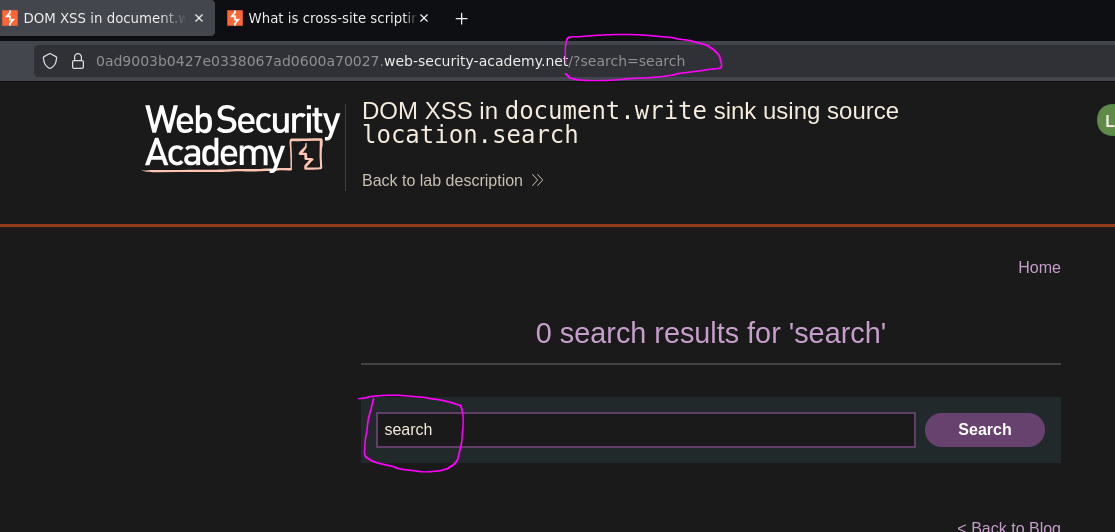
We find a blog with a search bar. Searching for any value puts it in the URL:
/?search=search
Phase 2 — Testing Basic Injection
<script>alert(0)</script>
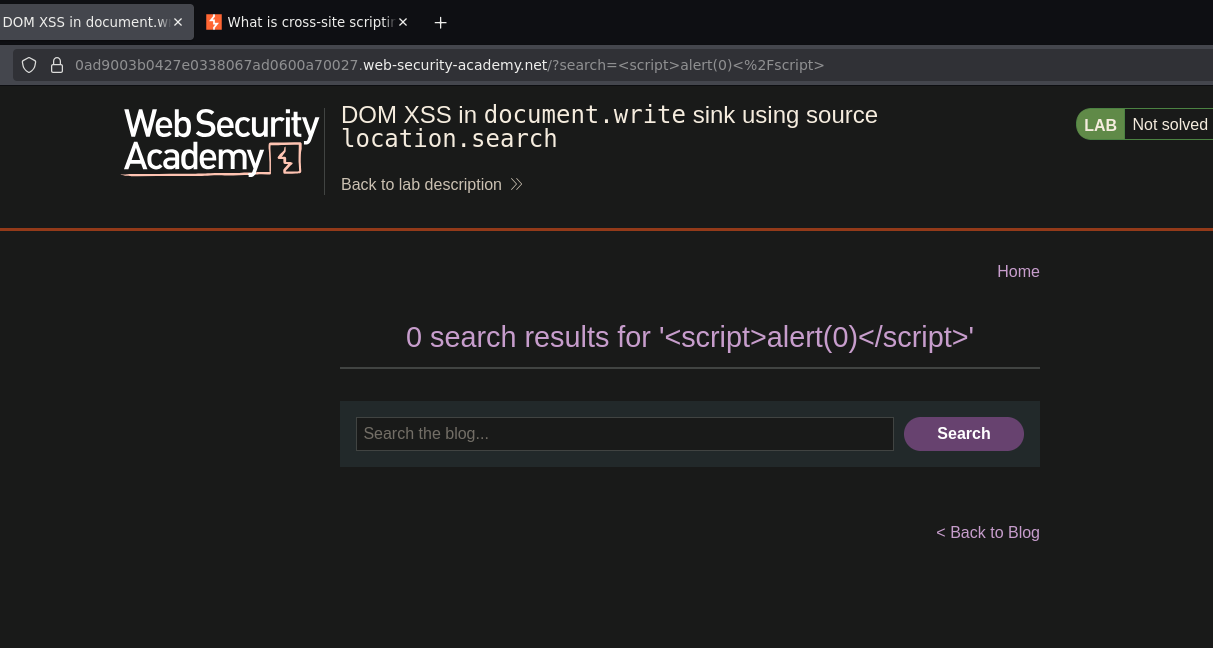
No alert. Inspecting the HTML in DevTools revealed why — the input landed inside an img tag attribute, not as free HTML:
<img src="/resources/images/tracker.gif?searchTerms=<script>alert(0)</script>">
The < and > were HTML-encoded inside the attribute value — the script tag is treated as literal text. The payload is trapped inside a string. The server returned a safe response; the vulnerability lies elsewhere.
Phase 3 — Identifying the Sink
The application is running JavaScript like this:
document.write('<img src="/resources/images/tracker.gif?searchTerms=' + location.search + '">');
Our input is concatenated directly into the src attribute of an img tag via document.write(). The source is location.search — the URL query string. The sink is document.write() — a function that writes raw HTML to the page.
To execute JavaScript we need to break out of the attribute context first, then inject script as free HTML.
Phase 4 — Breaking Out of the Attribute Context
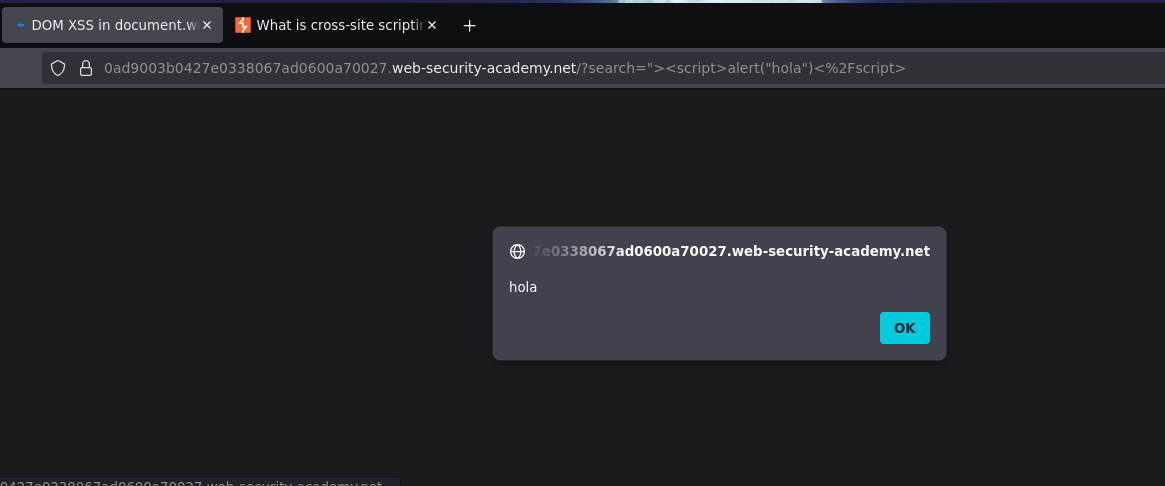
"><script>alert("hola")</script>
"— closes thesrcattribute value>— closes the<img>tag<script>alert("hola")</script>— payload injected as free HTML
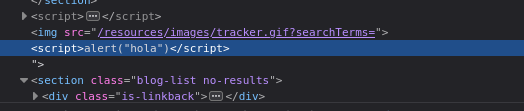
The resulting DOM:
<img src="/resources/images/tracker.gif?searchTerms=">
<script>alert("hola")</script>
Alert fired. Lab solved.
Conclusion
- A basic
<script>alert(0)</script>payload produced no alert — DevTools showed the input was HTML-encoded inside animgsrcattribute, trapping the payload as literal text. - The client-side JavaScript was calling
document.write()withlocation.searchconcatenated directly into an HTML string — the source waslocation.search, the sink wasdocument.write(). - The context was an HTML attribute — escaping required closing the attribute (
"), closing the tag (>), then injecting the script as free HTML. - The payload
"><script>alert("hola")</script>broke out of the attribute and executed.
Why This is Different from Reflected XSS
| Reflected XSS | DOM-Based XSS | |
|---|---|---|
| Where the vulnerability is | Server-side — server includes unsanitized input in the HTML response | Client-side — JavaScript reads and writes unsanitized input to the DOM |
| Does the payload reach the server? | Yes — the server reflects it | Not necessarily — may be processed entirely by client JS |
| What generates the dangerous HTML? | The server | The browser's own JavaScript |
| How to detect it | Input reflected in the HTTP response | JavaScript reading from sources like location.search and writing to sinks like document.write() |
In this lab, the server received the <script> tags and encoded them safely in the response. The vulnerability was not in the server response — it was in the JavaScript calling document.write() with the raw URL value, causing the browser to inject the payload into the DOM after the page loaded.
Sources and Sinks
DOM XSS is described in terms of sources (where untrusted data comes from) and sinks (dangerous functions that write data to the DOM):
Common sources:
location.search // URL query string (?param=value)
location.hash // URL fragment (#value)
location.href // full URL
document.referrer // referring page URL
document.cookie // cookie values
Common dangerous sinks:
document.write() // writes raw HTML to the page
innerHTML // sets raw HTML content of an element
outerHTML // replaces element with raw HTML
eval() // executes a string as JavaScript
setTimeout() // can execute a string as JS
In this lab the source was location.search and the sink was document.write().
Key Concepts
DOM XSS lives entirely in client-side JavaScript — the server may return a perfectly safe HTML response. The vulnerability is introduced by JavaScript running in the browser after page load. A scanner that only inspects server responses may miss it entirely.
Context determines the payload — finding injection is only the first step. Understanding where input lands (inside an attribute, inside a script block, as free HTML) determines how the payload must be structured to break out and execute. Injecting <script> directly into an attribute value will not execute — it must reach the HTML context.
Breaking out of an attribute requires "> before the payload — " closes the attribute value, > closes the tag, and everything after is interpreted as new HTML nodes.
document.write() with untrusted input is inherently dangerous — modern JavaScript best practices avoid it entirely. Use textContent instead of innerHTML when HTML rendering is not needed, and never concatenate URL parameters directly into HTML strings.