Reflected XSS AngularJS sandbox escape without strings
| Field | Value |
|---|---|
| Platform | PortSwigger Web Security Academy |
| Difficulty | Expert |
| Vulnerability | AngularJS Sandbox Escape — No $eval, No Strings |
| Injection Point | URL parameter name evaluated via $parse |
| Goal | Execute alert(1) by escaping the AngularJS sandbox without string literals |
Lab — AngularJS Sandbox Escape: No $eval, No Strings
What is the AngularJS Sandbox?
Before diving into the exploit, it's worth understanding what the sandbox is and why it exists.
Analogy: Imagine AngularJS as a restaurant kitchen. The {{ }} template expressions are orders you can place as a customer. The sandbox is the waiter who stands at the kitchen door and stops you from walking into the kitchen yourself and touching the stoves, knives, and gas lines. You can order food — but you can't access the dangerous equipment directly.
The sandbox specifically blocks access to:
- window and document (the browser's global objects)
- Function and eval (arbitrary code execution)
- constructor and __proto__ (prototype chain access)
- Any property that could reach outside the Angular scope
So {{1+1}} → 2 works fine. But {{alert(1)}} gets blocked — the sandbox sees alert and stops it.
What the Vulnerable Code Does
Searching for teto produces this Angular controller:
angular.module('labApp', []).controller('vulnCtrl', function($scope, $parse) {
$scope.query = {};
var key = 'search';
$scope.query[key] = 'teto';
$scope.value = $parse(key)($scope.query);
});
Breaking this down:
$scope.query— an empty object that holds query parametersvar key = 'search'— the key name comes from the URL parameter name$scope.query[key] = 'teto'— the URL parameter value is stored in the object$parse(key)($scope.query)— this is the vulnerability
$parse takes a string and evaluates it as an Angular expression against a scope object. Here it's evaluating the key name (e.g. search) as an expression against $scope.query. This means whatever we put as the URL parameter name (not value) gets evaluated by Angular's expression parser.
Testing with ?search=teto&kasane=1 adds a second key:
var key = 'kasane';
$scope.query[key] = '1';
$scope.value = $parse(key)($scope.query);
kasane is evaluated as an Angular expression — kasane is just a property lookup, harmless. But we can inject more complex expressions as the key name.
The Sandbox Escape Payload
From the PortSwigger XSS cheat sheet, the sandbox escape payload is:
toString().constructor.prototype.charAt=[].join;[1,2]|orderBy:toString().constructor.fromCharCode(120,61,97,108,101,114,116,40,49,41)
In the URL (with = encoded as %3d):
/?search=teto&toString().constructor.prototype.charAt%3d[].join;[1,2]|orderBy:toString().constructor.fromCharCode(120,61,97,108,101,114,116,40,49,41)=1
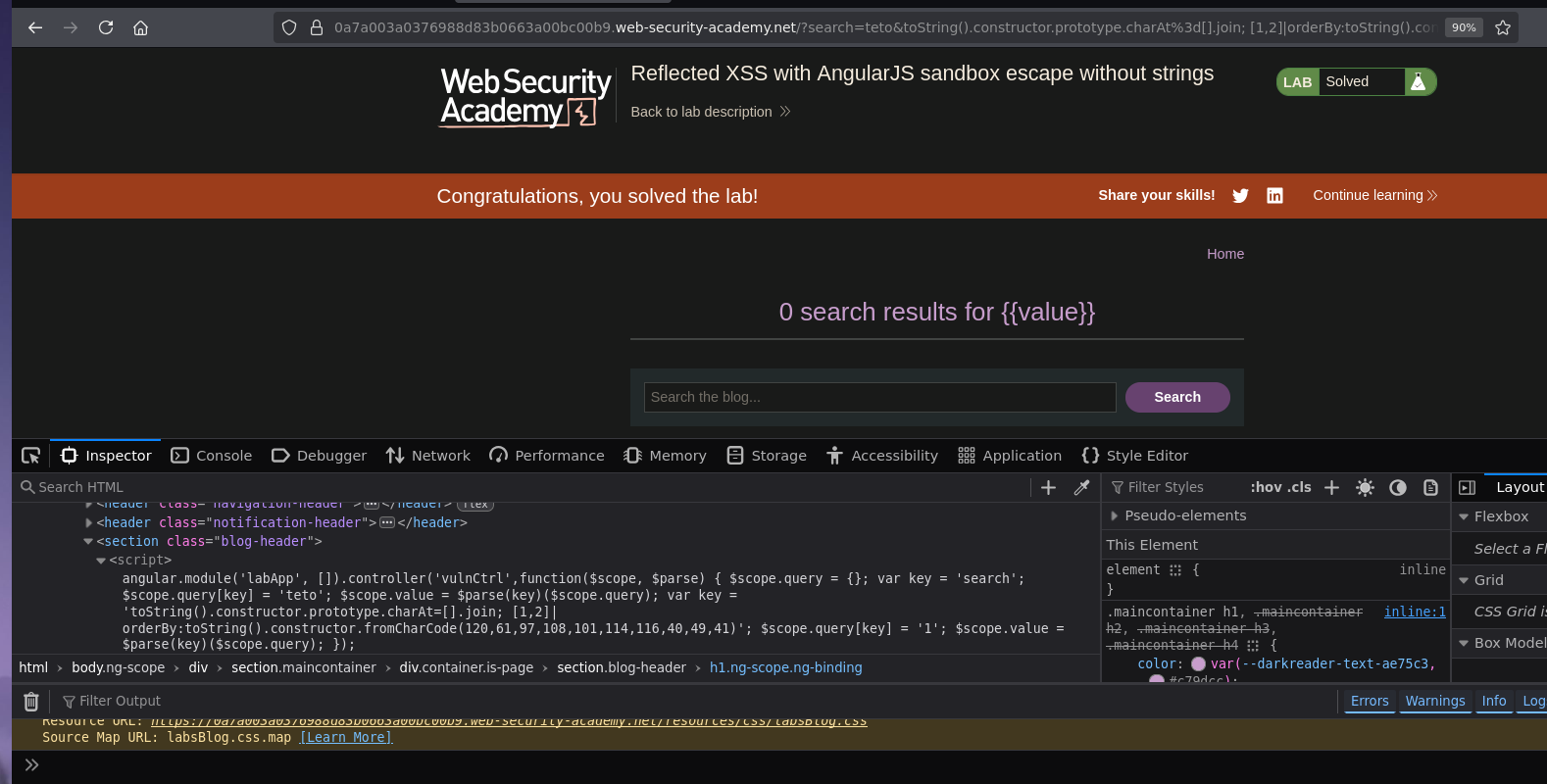
Alert fires and the lab is solved :P
How the Payload Works — Explained for Dummies
Let's break this into three parts.
Part 1 — toString().constructor.prototype.charAt=[].join
Analogy: The sandbox's security guard uses a specific method to check your ID before letting you in. We're going to replace that ID-checking method with a broken one so the guard can't check properly anymore.
toString() — every JavaScript object has a toString() method. Calling it on anything reaches the String prototype.
.constructor — from String's toString, .constructor is String itself.
.prototype.charAt — charAt is the method Angular's sandbox uses to inspect expressions character by character. It walks through your expression one character at a time to check if anything dangerous is there.
Analogy: Imagine the sandbox inspector reads your expression like this: "t... e... t... o... okay, nothing dangerous." It uses charAt to read one letter at a time.
= [].join — we replace charAt with Array.prototype.join. join doesn't behave like charAt — it joins array elements rather than returning single characters.
What this does: Angular uses charAt internally to parse and validate expressions safely. By replacing charAt with join, we break Angular's ability to inspect expressions character by character — the safety inspector's magnifying glass is replaced with a blender. The sandbox can no longer properly analyze what we're injecting.
Part 2 — [1,2]|orderBy:
Analogy: orderBy is a filter in Angular designed to sort arrays. Normally you'd use it like items|orderBy:'name'. But it accepts an expression as the sort key — and it evaluates that expression. We're handing it a sorting instruction that is secretly a code execution instruction.
[1,2] — a simple array (just a dummy target for orderBy to work with)
|orderBy: — pipe this array through the orderBy filter, using the following expression as the sort key
orderBy evaluates its sort key expression using $parse — the same vulnerable parser. Since we already broke charAt, orderBy's evaluation path now skips the sandbox checks that charAt was responsible for.
Part 3 — toString().constructor.fromCharCode(120,61,97,108,101,114,116,40,49,41)
Why we can't use strings: The lab specifically says strings are blocked. We can't write "alert(1)" or 'alert(1)' — Angular blocks them.
The solution: Build the string from character codes instead.
toString().constructor — reaches the String constructor (same path as before)
.fromCharCode(120,61,97,108,101,114,116,40,49,41) — String.fromCharCode() converts ASCII numbers into a string:
120 = x
61 = =
97 = a
108 = l
101 = e
114 = r
116 = t
40 = (
49 = 1
41 = )
Result: x=alert(1)
Why x=alert(1) instead of just alert(1)?
Analogy: The sandbox has a rule: "No function calls standing alone." But assignment expressions (x = something) look like they're just setting a variable — Angular might let them through because the result is the value of x, not the return of a function call.
x=alert(1) is an assignment expression. Its value is the return of alert(1) — which is undefined. From Angular's remaining perspective, this looks like assigning undefined to x, which seems harmless. But alert(1) was still called to compute that value.
This is the key trick: wrap the function call in an assignment so the sandbox sees an assignment (acceptable) rather than a bare function call (blocked).
The Full Chain — Everything Together
1. toString().constructor.prototype.charAt=[].join
→ Breaks Angular's character-by-character expression inspector
→ The sandbox can no longer properly validate what follows
2. [1,2]|orderBy:
→ Invokes the orderBy filter on a dummy array
→ orderBy evaluates its sort key expression via $parse
→ $parse now runs without the charAt safety checks
3. toString().constructor.fromCharCode(120,61,97,108,101,114,116,40,49,41)
→ Builds the string "x=alert(1)" without using any string literals
→ orderBy evaluates this as an expression
→ x=alert(1) executes → alert(1) fires